

// guide
Why Codex finishes browser tasks faster with Stagehand
Codex is a powerful AI assistant that can use a browser to accomplish complex tasks. We benchmarked Codex using Playwright vs. Stagehand to perform browser tasks, and found that Stagehand's in-browser runtime architecture makes your overall Codex tasks twice faster.
TL;DR AI assistants like Codex are heavily relying on browser use to accomplish complex tasks, often using a remote browser via an MCP or by writing their own Playwright code. We compared how Codex performed when using Playwright vs. Stagehand to perform browser tasks. It turns out that Stagehand's in-browser runtime architecture makes your overall Codex tasks twice faster.
AI Assistants are routinely accessing the web to get fresh context, however, with the rise of Grok Bot, Muse and Dots, they are now gradually handling more complex tasks that requires using a browser like a human.
This is why we built Stagehand v4, a new version rebuilt from scratch to provide more performant and token-efficient AI-driven web tasks.
As many of the Stagehand team use Codex every day to conduct deep research, handle recurring tasks, we naturally wondered what would happen if we instructed Codex to use Stagehand to interact with the web. The result: Codex tasks involving browser use completed twice faster, despite performing the same number of steps.
This article explores how we benchmarked Codex using Playwright vs. Stagehand and how to use Stagehand with Codex for your web automations.
How Codex drives a remote browser#
Codex's built-in browser runs locally using its in-app desktop app, mostly aimed at front-end work. However, similarly to Claude CoWork, most of recurring and long-running tasks are being moved to the cloud, where Codex uses a remote browser.
They are 3 different ways to set up Codex with a remote browser:
- Codex writes Playwright code while being attached to a remote browser using a CDP connection.
- Codex uses the Playwright MCP that executes actions on the configured remote browser.
- Codex uses a provider integration like Stagehand and uses
run,snapshotandscreenshotover MCP to interact with the remote browser.
Our benchmark tested approaches 1 and 3, as our Stagehand Showcase already provides evidence of the 50% performance gain Stagehand MCP provides against Playwright MCP.
Codex with Playwright vs. Codex with Stagehand#
Codex was tested using Playwright and Stagehand, both over a CDP connection to browsers running on the Browserbase platform running in the same region (us-west-2). Both scenarios were evaluated using the same model (gpt-6.1-sol, medium reasoning), over 15 multi-step tasks from onlineMind2Web chosen by fixed rules (8+ reference steps, interaction beyond navigation, no login or checkout, one per site), 2 trials each, 60 runs, graded by an LLM verifier.
The result: Stagehand is 2x faster and more reliable
| Codex + Playwright | Codex + Stagehand | |
|---|---|---|
| Median time per run | 186s | 88s |
| p90 time per run | 331s | 222s |
| Tasks where it was faster | 2 of 15 | 13 of 15 |
| Median tool calls | 20 | 20 |
| Median model turns | 21 | 21 |
| Cost per task | $0.117 | $0.118 |
| Success rate | 19/30 | 24/30 |
First, both setup ended up costing the amount of tokens, roughly ~$0.117 per task, and surprisingly performed the same number of steps (more on that later!).
What stands out is the overall performance and reliability of each configuration. Beyond being faster, Stagehand turned out to also to reach a higher success rate than Playwright.
Given that both configuration performed the same median number of steps, what made Stagehand quicker? Let's deep dive into this.
What makes Stagehand faster?#
To answer this question, let's look at more granular data points:
| Playwright | Stagehand | |
|---|---|---|
| Time in tools | 117s | 38s |
| Time waiting on model | 66s | 48s |
| Input tokens | 330K | 403K |
| Output tokens | 2,504 | 974 |
The story gets clearer now: on average, despite performing the same number of steps for each task, Stagehand tool calls are way faster (roughly 1.9s vs 5.9s per call).
With Playwright, every step is a fresh script with selectors, waits and error handling. With Stagehand, Codex makes short calls against snapshot element IDs. About 60% fewer output tokens, and output is the slow part of a turn.
The core speed component resides in Stagehand's architecture
In the Playwright setup, every step is a fresh code snippet the model writes and the bridge executes. In the Stagehand one, Codex makes short calls against snapshots with element IDs, and the driver does the work in the browser.
Beyond having different network roundtrip optimizations, the Codex with Playwright setup generates Playwright code using a lot of waits and retries, while the Stagehand handles page settling directly next to the browser.
In short, Stagehand's in-browser architecture provides performance gains at the network and execution levels.
A visual example on ted.com
Nothing is better than a concrete visual example. Our benchmarks include a task asking for Codex to find the most-viewed TED Talk about robots. Both Playwright and Stagehand setup succeeded by returning the "The astounding athletic power of quadcopters" talk by Raffaello D'Andrea.
However, here's how they navigated their way to this goal:
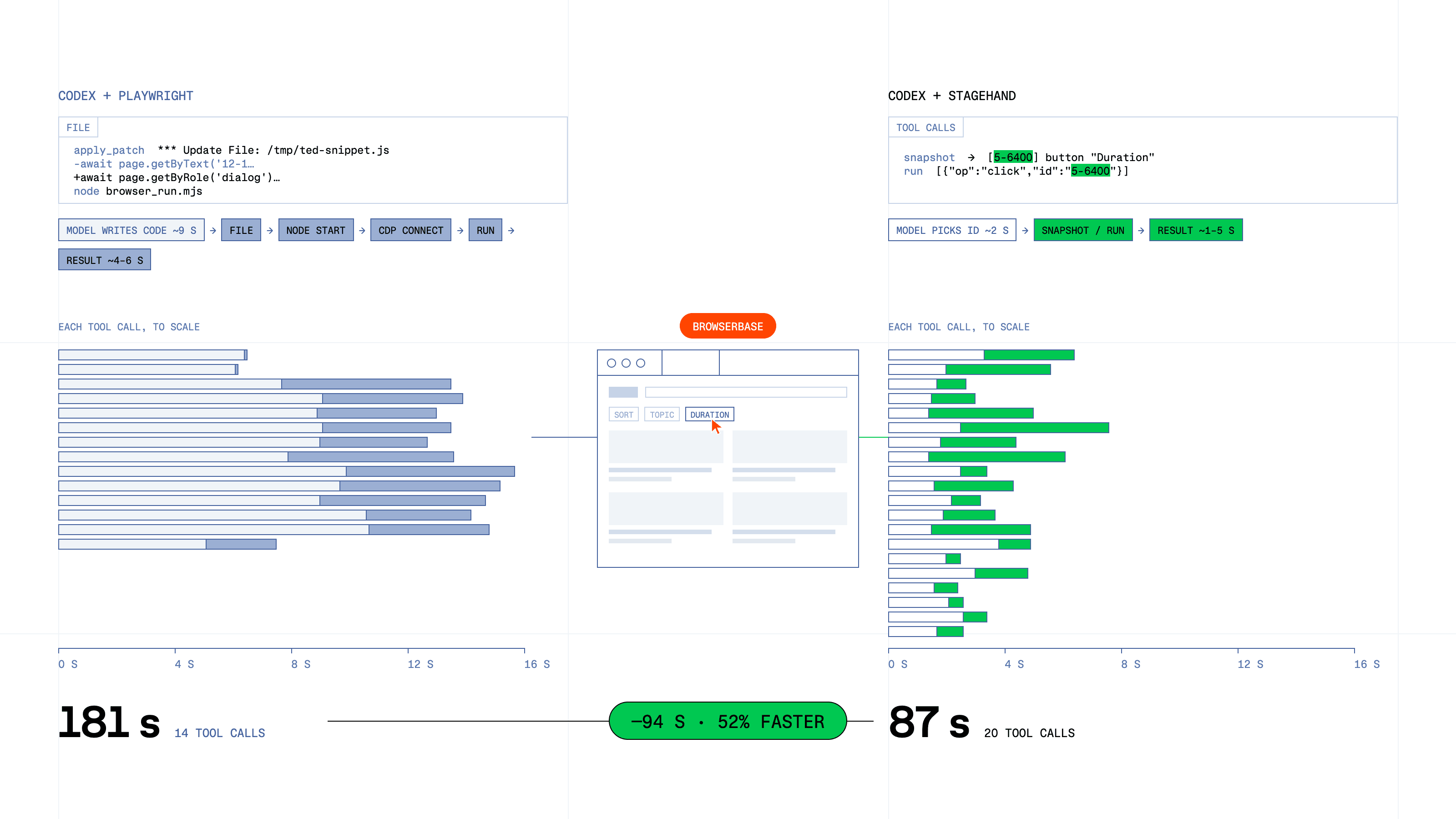
Interestingly, Stagehand completed the task 52% faster while performing more steps, mostly because each action only required Codex to send actions to Stagehand's driver instead of generating code + performing multiple CDP roundtrips.
Setup Codex with Stagehand#
You don't need to rewrite anything, Codex keeps its model, its harness and its credentials. Stagehand plugs in as an MCP server, and a single server process owns the browser, so page state carries over from one tool call to the next.
1. Build the Stagehand integration
git clone https://github.com/browserbase/stagehand.gitcd stagehand && pnpm install && pnpm build2. Add Stagehand to your Codex config
Open ~/.codex/config.toml and add:
[mcp_servers.stagehand]
	command = "node"
	args = ["/absolute/path/to/stagehand/packages/integrations/core/dist/facade/stdio-server.mjs"]
[mcp_servers.stagehand.env]
	STAGEHAND_BROWSER = "browserbase"
	BROWSERBASE_API_KEY = "bb_live_..."
That's it. Codex now has three new tools: run, snapshot and screenshot. The MCP server only receives your Stagehand and Browserbase configuration. Your OpenAI credentials stay with Codex.
3. Give Codex a browser task
Start simple to check the connection: "Use Stagehand to open stagehand.dev and tell me the page title." Then hand it a real multi-step task, the kind with filters, forms or several pages. That's where the 2x shows up.
The full setup guide is in the Codex integration docs.